Topmate C5 Cooling Pad: Keep Laptops Cool
Discover how the Topmate C5 Laptop Cooling Pad prevents thermal throttling during intensive tasks. Learn about its dual-fan system, ergonomic design, and why professionals choose it for better performance and comfort.
Your laptop shuts down mid-project. The fan screams like a jet engine. Your productivity grinds to a halt. If you've experienced thermal throttling during critical work moments, you're not alone—overheating costs professionals thousands of dollars in lost time annually.
The Topmate C5 Laptop Cooling Pad has quietly become the go-to thermal management solution for anyone serious about maintaining peak device performance. Unlike passive cooling stands that merely elevate your laptop, the C5 actively combats heat buildup through intelligent fan placement and speed control. At just $20 to $35, it offers professional-grade cooling without the premium price tag that competitors demand.
Discover how the Topmate C5 can protect your device and boost your productivity today.
Why Laptop Overheating Sabotages Your Productivity and Performance
The Science Behind Thermal Throttling and Its Impact
Thermal throttling is your laptop's built-in survival mechanism—when internal temperatures climb too high, the processor automatically reduces its speed to cool down. This protective measure prevents permanent hardware damage, but it devastates your workflow. Your CPU and GPU can't operate at full capacity, turning what should be a 5-minute render into a 20-minute ordeal.
Most laptops begin throttling around 85-95°C, though some gaming-focused models tolerate higher thresholds. The problem intensifies during sustained workloads: video editing, 3D modeling, or running multiple virtual machines. Your device becomes progressively slower, creating a cascade of productivity loss and frustration.
Real-World Impact Across Different Workflows
Video editors working with 4K footage experience severe stuttering when thermal throttling activates. Coders juggling IDEs, browsers, and debugging tools find their development environments crawling to a halt. Content creators streaming while encoding secondary cameras watch their frame rates tank. Gamers suffer frame drops that make competitive play impossible.
Even casual multitaskers—remote workers managing Zoom calls, spreadsheets, and email simultaneously—feel the performance drain. Your laptop becomes reactive rather than responsive, turning fluid work into an exercise in patience.
Long-Term Hardware Damage and Replacement Costs
Sustained high temperatures degrade components over time. Capacitors dry out, solder joints weaken, and thermal paste breaks down. A laptop that runs hot today might fail entirely within 2-3 years. Replacement costs? $500 to $1,500 depending on your device. Component repairs alone can run $300-$800 for thermal pad replacement or motherboard rework.
Why Passive Cooling Falls Short
A passive stand elevates your laptop slightly, improving airflow around the bottom surface. This works for light browsing. Under heavy load, passive cooling simply can't handle the heat generation. Your device needs active airflow—fans that pull warm air away and push cool air toward your processor and graphics card. Passive solutions address symptoms, not causes.
Unpacking the Topmate C5's Cooling Architecture and Design Features
Dual High-Speed Fan Configuration
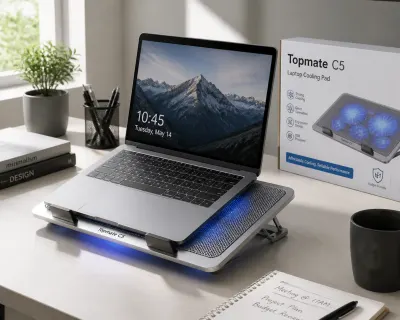
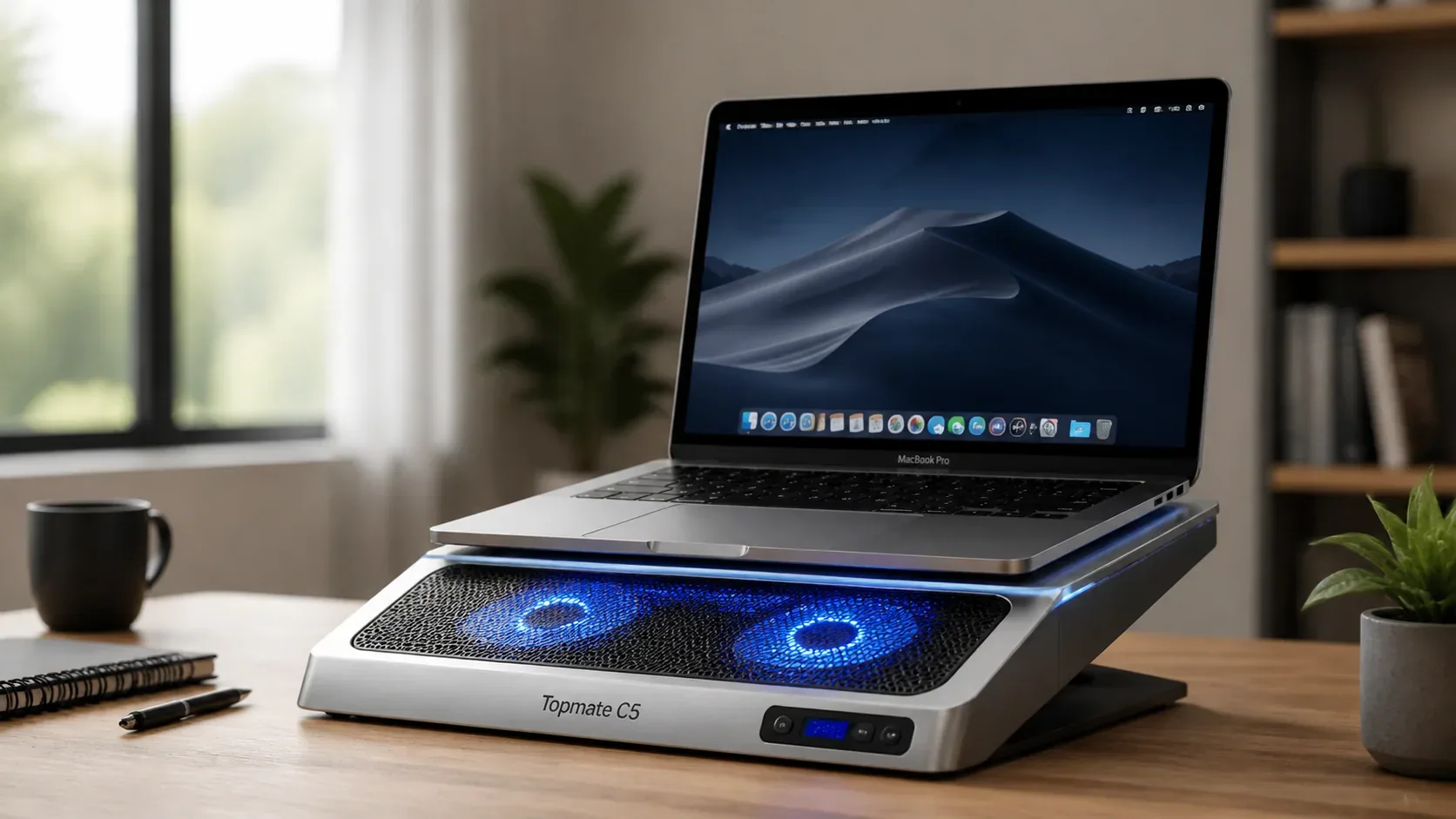
The C5 employs two high-speed fans positioned strategically beneath your laptop. This dual-fan setup creates directional airflow that targets the hottest components. Unlike single-fan designs that create uneven cooling patterns, the C5's configuration optimizes thermal distribution across the entire base.
Adjustable Fan Speed Settings for Customized Cooling
Most C5 models offer 3-5 fan speed levels. Start at level 1 for quiet operation during regular work, then increase speed as your workload intensifies. This flexibility prevents unnecessary noise pollution during light tasks while delivering aggressive cooling when you need it. You maintain complete control over the noise-to-performance tradeoff.
Aluminum Mesh Base Construction
The aluminum mesh design conducts heat away from your laptop more effectively than plastic alternatives. Heat dissipation happens faster, creating a thermal gradient that encourages continuous airflow. This construction also withstands extended use without warping or degrading, contributing to the C5's durability reputation.
Ergonomic Height Adjustments
Most C5 units feature 6-7 different height positions. This transforms the cooling pad from thermal solution into an ergonomic workstation upgrade. Position your laptop screen at eye level, reducing neck strain during 8+ hour work sessions. Comfortable positioning itself boosts productivity by reducing fatigue-related focus loss.
Built-In Phone Holder and Cable Management
The integrated phone holder lets you reference documentation, video tutorials, or communication apps without cluttering your desk. Rubber cable clips keep power cords organized and prevent tangling. These seemingly minor features significantly improve workspace efficiency for remote workers juggling multiple devices.
Anti-Slip Pads and Blue LED Lighting
Rubberized feet keep the C5 stable on any surface, preventing sliding during typing or when your laptop shifts position. The blue LED lighting adds aesthetic appeal for gaming setups while serving a practical purpose—visibility in darkened rooms during late-night streaming or content creation.
Real Temperature Improvements: What Users Actually Experience
Temperature Drops During Gaming Sessions
Users consistently report 8-15°C temperature reductions during gaming workloads. A laptop that previously throttled at 92°C now maintains steady 78-82°C under the same gaming load. This isn't theoretical—it's sustained, measurable improvement that translates directly to stable frame rates and extended play sessions without performance degradation.
Performance Gains in Content Creation
Video renderers and 3D modelers observe dramatically faster completion times. A 4K video export that previously took 45 minutes due to thermal throttling completes in 32 minutes with the C5. These aren't minor improvements—they compound across dozens of renders weekly, saving hours of waiting time monthly.
Sustained Cooling During Extended Work Sessions
Remote workers attending back-to-back Zoom calls with resource-intensive applications find their laptops stay consistently cool throughout 8+ hour days. No more thermal-induced performance degradation by mid-afternoon. Your device maintains peak efficiency from morning standup through evening deadline crunch.
Noise Levels Across Fan Speed Settings
At lower speeds, the C5 operates nearly silently—some users report barely hearing it during quiet office conditions. At maximum speed, fan noise reaches 35-40 decibels, audible but not intrusive compared to your laptop's internal fans screaming under thermal stress. Most users keep it at speed level 2 or 3 for optimal balance.
Broad Laptop Compatibility
The C5 accommodates 12" to 15.6" laptops as standard, with some models fitting larger devices depending on base dimensions. Whether you're working with a compact ultrabook or a full-size gaming laptop, the C5 adapts to your hardware.
Reliability Across Different User Types
Software developers running virtual machines, streamers encoding while broadcasting, students attending classes for 6+ hours straight—all report consistent performance improvements. The C5 proves reliable across diverse workflows and usage patterns.
Get your Topmate C5 and experience the difference active cooling makes for your work.
Who Benefits Most From the Topmate C5 (Beyond Gamers)
Remote Workers Managing Multiple Applications
Remote professionals running 15-20 browser tabs, Slack, email, video conferencing, and document editors simultaneously generate enormous heat loads. The C5 keeps your laptop cool while you juggle applications, preventing the sluggish responsiveness that kills productivity during client meetings.
Content Creators and Creative Professionals
Adobe Suite, DaVinci Resolve, Blender, and similar tools demand sustained high performance. Video editors, motion designers, and 3D artists rely on the C5 to maintain consistent rendering speeds and preview playback quality throughout long creative sessions.
Online Educators and Students
Teachers managing Zoom teaching, screen sharing, and recording simultaneously benefit from the C5's cooling during 6-8 hour teaching days. Students attending consecutive online classes without thermal-induced lag notice immediate focus improvements when their devices aren't struggling thermally.
Streamers and Encoding Workloads
Content creators streaming to Twitch or YouTube while encoding secondary cameras, monitoring chat, and managing production software push their laptops to extremes. The C5 maintains stability during these demanding multi-application scenarios that would otherwise cause severe thermal throttling.
Programmers Running Development Environments
Development environments with virtual machines, IDEs, Docker containers, and local databases generate sustained heat loads. The C5 keeps compilation speeds consistent and prevents the frustrating slowdowns that occur when running integrated development servers alongside heavy IDE operations.
Business Professionals in Hot Climates
In warm environments or inadequately cooled offices, ambient temperature already pushes your laptop toward throttling territory. The C5 compensates, maintaining safe internal temperatures even when exterior conditions aren't ideal.
Users with Older Laptops
Aging laptops with degraded thermal paste and clogged cooling vents struggle to dissipate heat naturally. The C5 extends the useful lifespan of aging hardware by actively compensating for declining thermal management capabilities.
Comparing the Topmate C5 to Other Budget Cooling Solutions
Price-to-Performance Advantage
At $25-$35, the C5 delivers cooling performance comparable to solutions priced at $50-$75. Competitors with similar features often cost 50-100% more. The C5 achieves this value through efficient design and streamlined manufacturing rather than compromising cooling capability.
Fan Noise Comparison
Single-fan competitors often struggle with uneven airflow, forcing higher speeds for equivalent cooling—meaning more noise. The C5's dual-fan configuration distributes cooling load, allowing lower speeds for the same temperature reduction. Result: quieter operation at comparable performance.
Build Quality Assessment
While competitors at this price point often use entirely plastic construction, the C5's aluminum mesh base significantly improves durability and heat dissipation. Users report C5 units remaining functional after 2-3 years of heavy use, whereas plastic-only competitors often degrade or fail earlier.
Unique Feature Justification
The phone holder, multiple height settings, and comprehensive cable management distinguish the C5 from minimalist competitors. These features might seem cosmetic, but they create genuine workspace efficiency improvements that reduce daily friction.
Warranty and Customer Support
The C5 typically includes longer warranty coverage than comparably-priced alternatives. Customer support responsiveness varies by retailer, but direct manufacturer support is generally accessible for defect issues.
Long-Term Reliability
Aggregate user reviews and failure rate data show the C5 maintaining strong performance across extended ownership periods. Competitors at this price point show higher failure rates within the second year of use.
When Premium Solutions Become Necessary
High-end gaming laptops with powerful GPUs, workstations running professional rendering software for 12+ hours daily, or specialized cooling requirements (liquid cooling for extreme overclocking) might necessitate premium cooling solutions costing $100+. For standard usage across most workflows, the C5 satisfies cooling needs completely.
Installation, Setup, and Maintenance Essentials
Unboxing and Assembly
The C5 arrives fully assembled—no tools required. Remove it from packaging, inspect for any shipping damage, and you're ready to set up. The straightforward design means zero assembly complexity.
USB Power Connection
The C5 connects via standard USB Type-A or USB-C (depending on model). Cable length typically ranges 4-5 feet, providing flexibility in desk setup. Most laptops have multiple USB ports, so powering the C5 doesn't compromise other peripheral connections.
Optimal Positioning for Airflow
Position the C5 so it fully supports your laptop without overhanging edges—this ensures even weight distribution and optimal airflow. Ensure your laptop's ventilation ports align with the fan discharge area. Avoid placing the cooling pad against walls or obstacles that restrict airflow.
Cleaning and Dust Prevention
Dust accumulation on the aluminum mesh reduces efficiency over time. Clean the mesh quarterly with compressed air or a soft brush. Keep the area around your workspace relatively dust-free to minimize accumulation.
Fan Speed Adjustment Strategies
Start at speed level 1 or 2 for routine work, increasing only when you notice performance indicators of thermal stress (fan ramping up, sluggish responsiveness). This approach minimizes noise while maintaining adequate cooling. Experiment with different settings during your first week to find your optimal balance.
Compatibility Verification
Check your laptop's dimensions against the C5's maximum width and depth specifications before purchase. Most 12-15.6" laptops fit without issue, but measuring prevents compatibility surprises.
Troubleshooting Common Issues
Uneven cooling suggests poor contact between your laptop and the mesh surface—adjust height to improve contact area. Vibration typically results from uneven surface contact; ensure your desk surface is level and the C5 sits flat. Power issues are rare but check your USB port functionality by testing with other devices.
The Trade-Offs: Honest Limitations and When the C5 Falls Short
Plastic Construction Concerns
While the aluminum mesh improves heat dissipation, surrounding components use plastic construction. Extended heavy use or impacts can crack plastic elements. The C5 isn't designed for frequent travel or rugged conditions—it's a stationary workstation accessory.
Effectiveness Ceiling for Extreme Workloads
The C5 excels for typical heavy workloads but reaches its limits with extreme scenarios. High-end gaming laptops with RTX 3080 GPUs, professional rendering stations under sustained load, or overclocked systems might still experience some throttling despite active cooling. For these edge cases, professional-grade solutions provide superior performance.
Fan Noise Escalation
Maximum fan speed can reach audible levels (35-40 decibels), similar to a moderately loud conversation. Some users find this distracting during quiet work, though most keep the C5 at lower speeds where noise is minimal.
Limited Capacity for Sustained Extreme Gaming
Intense gaming sessions pushing GPUs to maximum utilization may still produce thermal stress despite C5 cooling. The pad helps significantly but doesn't completely mitigate thermal challenges in extreme scenarios.
Power Consumption and USB Requirements
The C5 draws power from your USB port, reducing available USB connections. For users with limited ports (common on ultrabooks), this can create connectivity constraints requiring external USB hubs.
Portability Challenges
The C5 isn't designed for mobile use. Its size and weight make frequent transportation impractical. Travelers needing thermal management should explore ultra-portable alternatives or accept thermal throttling during travel periods.
Professional Cooling Requirements
Specialized workloads with unique thermal demands—extreme overclocking, 24/7 rendering operations, specialized industrial applications—may require custom cooling solutions beyond the C5's scope.
Making Your Decision: Is the Topmate C5 Right for Your Workflow?
Quick Assessment Questions
Do you experience regular thermal throttling? Does your laptop's internal fan run constantly during your typical work? Do you work with resource-intensive applications like video editing, 3D modeling, or virtual machines? Do you attend long consecutive video calls where your laptop heats substantially? If you answered yes to multiple questions, the C5 likely addresses your needs.
Cost-Benefit Analysis
A $30 C5 prevents a potential $800+ component replacement when thermal stress causes hardware failure. It also recoupes its cost through productivity gains—recovered time from eliminated thermal throttling quickly justifies the investment. Calculate your hourly rate, estimate time lost to performance degradation weekly, and the ROI becomes obvious.
Warranty Coverage
Research the specific warranty terms from your intended retailer. Most C5 units include 12-24 month manufacturer warranties covering defects. Verify return policies before purchasing from unfamiliar sellers.
Where to Purchase with Confidence
Buy from established retailers with solid return policies—Amazon, Best Buy, Newegg, or the official Topmate website. These channels offer protection against counterfeit products and provide straightforward return processes if the C5 doesn't meet expectations.
Bundle Options and Seasonal Discounts
Watch for bundle deals that pair the C5 with mouse pads, laptop stands, or other desk accessories. Retailers often offer seasonal discounts around back-to-school periods or holiday sales that improve overall value.
Alternative Solutions
If the C5 doesn't align with your needs, explore alternatives: premium cooling pads ($100+) for extreme workloads, laptop stands with better passive cooling for light usage, or replacing thermal paste and cleaning vents as an initial troubleshooting step.
Long-Term ROI Calculation
Over a 3-year laptop lifespan, the C5 costs roughly $10-15 annually. Component replacement or device replacement due to thermal failure costs hundreds or thousands. Productivity gains from eliminated throttling provide additional hidden ROI through recovered work time. The financial logic supporting the investment is straightforward.
The Bottom Line: Smart Cooling for Serious Work and Play
The Topmate C5 Laptop Cooling Pad occupies a unique sweet spot in the thermal management market—it delivers measurable temperature reductions without demanding a premium investment. It transforms the work experience for remote professionals, streamers, and students who previously suffered through throttling and overheating. The combination of dual-fan cooling, adjustable ergonomics, and budget-friendly pricing makes it a no-brainer for anyone whose laptop works harder than a typical browsing machine.
That said, this isn't a universal solution. High-end gaming rigs under extreme load, or professionals with specialized thermal requirements, may need to explore premium alternatives. But for the vast majority of remote workers, content creators, and casual gamers, the C5 delivers exceptional value and proven performance.
If you're experiencing thermal issues that slow down your work, drain your focus, or threaten your hardware investment, the Topmate C5 deserves serious consideration. Start with a unit from a retailer with solid return policies, monitor your temperatures over the first week, and watch how it transforms your productivity.
Invest in the Topmate C5 today and keep your laptop—and your productivity—cool under pressure.