Apolosign Portable Monitor: Gaming On-the-Go
Discover how the Apolosign Portable Monitor delivers console gaming and mobile gaming power in a lightweight, portable package. Full HD visuals, USB-C connectivity, and gamer-friendly features reviewed.
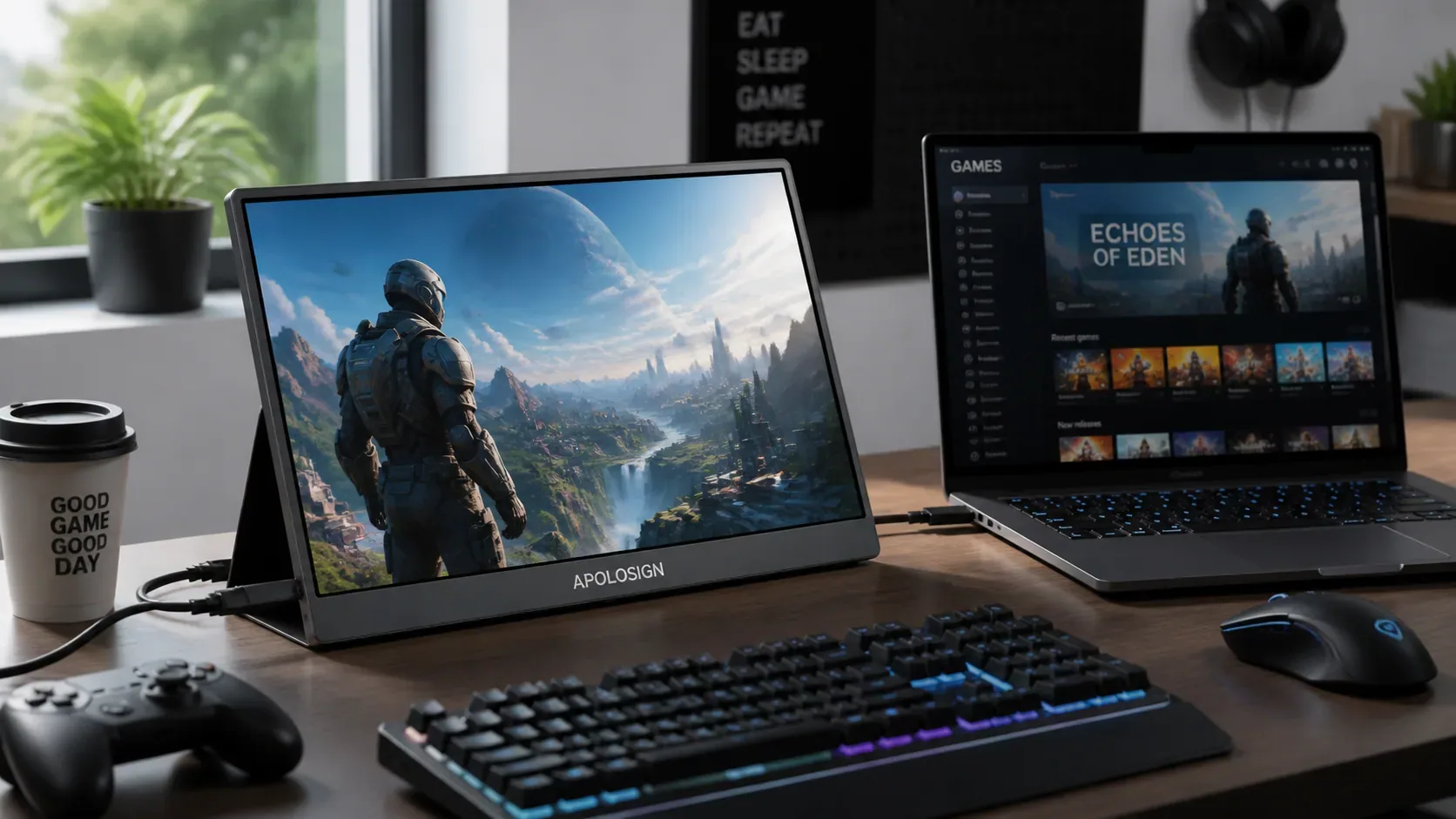
Gaming doesn't have to be confined to your desk anymore. With portable gaming becoming increasingly mainstream and the global mobile gaming market expected to hit record highs, players are ditching stationary setups in favor of flexibility. The Apolosign Portable Monitor has emerged as a game-changer for console and mobile gamers who refuse to compromise on screen real estate or visual quality.
These lightweight 15.6-inch displays pack Full HD 1080p resolution, IPS panels with wide viewing angles, and multi-device compatibility at a price point that won't drain your gaming budget. Whether you're playing on Nintendo Switch, PlayStation, mobile devices, or your laptop, this portable monitor bridges the gap between convenience and performance.
Discover the Apolosign Portable Monitor and transform your gaming experience today.
Gaming Performance: Console and Mobile Display Quality
Full HD 1080p Resolution and Visual Impact Across Platforms
The 1080p resolution delivers crisp, detailed visuals that scale beautifully across gaming platforms. On Nintendo Switch, the jump from the handheld screen to 15.6 inches of Full HD is immediately noticeable, making indie games and AAA titles feel more immersive. PlayStation and Xbox games maintain excellent clarity at this resolution, providing the visual fidelity gamers expect without requiring premium high-refresh displays for casual play.
IPS Panel Technology and Wide Viewing Angles
IPS panel technology ensures consistent color reproduction and brightness even when viewing the screen from angles. During multiplayer gaming sessions where friends gather around the monitor, everyone maintains a clear, undistorted view regardless of their position. This becomes particularly valuable during couch co-op sessions or when streaming gameplay to spectators sitting to the side.
Refresh Rate Capabilities and Responsiveness
While the Apolosign doesn't advertise extreme refresh rates, it handles standard 60Hz gaming smoothly for most titles. Fast-paced games run responsively without noticeable stuttering, though competitive esports players accustomed to 144Hz+ displays may notice the difference during intense matches. For the vast majority of gamers, the refresh rate performs admirably.
Color Accuracy and Brightness During Gameplay
Color accuracy stands out for a portable monitor in this price range, rendering game environments with natural tones and good saturation. Brightness levels work well indoors and during typical gaming sessions, though direct sunlight exposure can wash out the display. Adjusting angle and using a sun shade resolves most brightness concerns in outdoor settings.
Screen Size Transformation and Device Comparison
The 15.6-inch screen represents a substantial upgrade from smartphone screens (typically 5-7 inches) and even handheld gaming devices (3-7 inches). This size expansion transforms mobile gaming into a legitimate desktop experience, making text readable and action sequences clearer. Compared to traditional 24-27 inch gaming monitors, the Apolosign maintains portability while providing meaningful screen real estate.
Connectivity Options for Seamless Gaming Setup
USB-C Connectivity and Power Delivery
USB-C serves as the primary connection method for many devices and handles both video transmission and power delivery simultaneously. This single-cable approach reduces clutter and simplifies setup, particularly for laptops and newer mobile devices. Power delivery capabilities ensure the monitor can charge compatible gaming devices while displaying content.
Mini-HDMI Port for Console Gaming
The mini-HDMI port connects directly to Nintendo Switch, PlayStation, and other consoles with appropriate adapters. This wired connection guarantees stable, lag-free gaming without wireless connectivity concerns. The included or readily available adapters make console integration straightforward.
Wireless Connectivity and Bluetooth Pairing
Bluetooth functionality enables wireless controller pairing and potentially wireless screen mirroring depending on the specific model. This feature adds convenience for gaming scenarios where cable routing proves difficult or aesthetically undesirable.
Multi-Device Switching and Platform Transitions
Switching between devices typically requires unplugging one cable and connecting another, a process that takes seconds. For gamers rotating between Switch, laptop, and mobile gaming, this flexibility eliminates the need for multiple displays or complex cable management systems.
Cable Management Solutions and Accessory Bundles
The included accessory bundle typically contains the necessary cables for most gaming scenarios. Velcro cable ties and organizational sleeves help manage cable clutter. Quality varies slightly between bundle variations, with some versions including premium carrying cases and additional adapters.
Compatibility Matrix Across Operating Systems
Windows, macOS, Android, and iOS devices all connect reliably to the Apolosign. Gaming console compatibility extends to Nintendo Switch, PlayStation 4/5, and Xbox systems with appropriate adapters. This universal compatibility eliminates device-specific concerns for most gamers.
Adapter Requirements and Additional Purchases
Depending on your gaming devices, you may need USB-C to HDMI adapters or mini-HDMI to full-HDMI converters. Most bundle options include at least one adapter, though frequent switchers between multiple device types might invest in additional adapters for convenience.
Explore connectivity options and find the perfect bundle for your gaming setup.
Portability Features That Gamers Actually Need
Weight, Dimensions, and Portability Comparison
The Apolosign weighs significantly less than traditional gaming monitors, typically ranging from 1-1.5 pounds depending on the model. Dimensions remain compact enough to slip into most laptop bags or backpacks. Compared to other portable gaming displays, the Apolosign maintains competitive dimensions while prioritizing screen size.
Build Quality and Durability of Frame Design
The metal frame provides durability without excessive weight, resisting bends and warping during travel. The matte-finish design reduces fingerprints and glare while maintaining a professional appearance. Construction quality holds up well through repeated packing and unpacking cycles typical of portable device use.
Stand Stability and Adjustability
The included stand offers adequate stability for tabletop gaming, though vigorous controller movements during intense sessions might cause slight wobbling. Adjustability options allow angle customization for ergonomic positioning. Some users prefer supplementary stands or iPad-style holders for enhanced stability.
Carrying Case Compatibility and Travel Gaming
The thin profile fits easily into laptop bags, messenger bags, or dedicated monitor cases. Many gamers transport it without a dedicated case, simply wrapping it in a soft cloth inside standard luggage. For LAN parties and tournaments, a protective carrying case provides peace of mind for valuable equipment.
Power Requirements and Battery Capabilities
The monitor requires external power through USB-C or a standard power adapter—there's no built-in battery. For extended gaming sessions away from outlets, a portable power bank with sufficient capacity can provide several hours of operation, though this adds bulk to your setup.
Durability Testing and Long-Term Reliability
Screen protection depends largely on carrying practices, though the IPS panel resists damage from minor impacts. Hinge strength (if applicable) remains reliable through hundreds of open-close cycles. Long-term reliability reports from users show consistent performance beyond two years of regular use.
Mid-Range Portable Monitor Comparison
Against other portable gaming monitors in the $100-$200 bracket, the Apolosign holds its ground with solid brightness, accurate colors, and reliable connectivity. Some competitors offer higher refresh rates or larger screens, while others cut corners on build quality. The Apolosign balances these factors effectively for its price tier.
Real-World Gaming Scenarios: Where the Apolosign Excels
Nintendo Switch Docking and Handheld Experience
Connecting the Switch transforms handheld gaming into a full portable console experience. The upgrade from the Switch's 6.2-inch screen to 15.6 inches is dramatic, making text readable and action visible. Handheld mode gaming (without docking) on the Apolosign via USB-C connection works seamlessly with most Switch titles.
PlayStation and Xbox Console Gaming
Using the Apolosign as a secondary display for PlayStation or Xbox enables gaming in locations beyond the living room. Bedrooms, dorm rooms, and travel accommodations suddenly become viable gaming spaces. The display handles both current and older console generations reliably.
Mobile Gaming with Extended Screen Real Estate
Connecting iOS or Android devices reveals how smartphone games benefit from larger screens. Strategy games, RPGs, and puzzle games feel more engaging on 15.6 inches, and text becomes easier to read during extended play sessions.
PC Gaming for Esports and Competitive Multiplayer
Laptops connect via USB-C for portable esports setups. While competitive players typically prefer higher refresh rate displays, the Apolosign serves competently for practice sessions and casual competitive play. The portability factor sometimes outweighs the refresh rate trade-off for traveling competitors.
Streaming Setup Potential
Content creators can use the Apolosign to display gameplay on a secondary display while streaming from a laptop. This setup eliminates the need for expensive multi-monitor rigs while maintaining portability for traveling streamers.
Travel Gaming in Hotels, Coffee Shops, and Outdoor Venues
Hotel rooms transform into gaming spaces with the lightweight Apolosign. Coffee shops provide impromptu gaming stations for mobile and casual titles. Outdoor gaming faces brightness limitations but remains viable in shaded areas. LAN events and gaming tournaments benefit enormously from portable display solutions.
Productivity-to-Gaming Transitions
Workers and students who game during breaks appreciate seamless transitions between productivity and entertainment. The same portable monitor extends a work laptop for productivity during the day and connects to gaming devices in the evening.
Speaker Quality and Audio Considerations for Gaming
Built-In Speaker Performance
The integrated speakers handle background music and casual gaming audio adequately. Volume reaches sufficient levels for solo gaming in quiet environments. Sound quality lacks the depth and richness of dedicated speakers or gaming headsets but remains acceptable for casual use.
Audio Latency and Synchronization
Latency between on-screen action and speaker audio remains minimal with wired connections. Wireless Bluetooth audio might introduce slight delays, though most gamers won't perceive issues during casual play.
Limitations for Competitive Gaming
Competitive gamers relying on audio cues for game sense will benefit from external audio solutions. The built-in speakers don't provide the directional audio accuracy or dynamic range competitive play demands.
Headphone Jack Options and External Speaker Integration
Most Apolosign models include a headphone jack for wired audio output. This connection works with gaming headsets, earbuds, and standalone speakers. External Bluetooth speaker pairing offers wireless audio flexibility for group gaming sessions.
Audio Quality Comparisons
Compared to gaming headsets, the built-in speakers produce noticeably compressed audio. Against dedicated monitor speakers or sound bars, the Apolosign's audio trails in presence and clarity. The speaker limitation ranks as a minor trade-off given the portability priorities.
Audio Enhancement Recommendations
For superior audio without sacrificing portability, wireless earbuds or compact gaming headsets provide excellent solutions. Portable Bluetooth speakers pair nicely with the monitor for group gaming scenarios. Budget-conscious users find the built-in speakers perfectly serviceable for casual gaming.
Price-to-Performance Analysis for Gaming Value
Cost Comparison in the $100-$200 Range
The Apolosign sits competitively within the portable gaming monitor market. Budget models under $100 typically sacrifice screen size or resolution. Premium options exceeding $200 add features like higher refresh rates or touch capability that casual gamers don't require.
Value Proposition and Competitive Feature Analysis
For the mid-range price point, the Apolosign delivers Full HD resolution, solid build quality, and multi-platform compatibility that competitors charge significantly more for. Feature parity with more expensive models suggests strong value for budget-conscious gamers.
Accessory Bundle Variations and Total Setup Cost
Bundle pricing varies seasonally and by retailer. Premium bundles including carrying cases, multiple adapters, and extended warranties cost more but reduce additional purchase requirements. Basic bundles require minimal supplementary spending for most gaming scenarios.
Long-Term Investment Perspective
The Apolosign's durable construction and reliable performance justify investment for gamers regularly traveling or gaming in multiple locations. Multi-year usefulness before needing replacement makes per-year cost quite reasonable.
Financing and Payment Options
Standard retailer financing options typically extend to portable monitor purchases. No specialized gaming financing exists, but payment plans through major retailers spread costs across several months.
Return on Investment Relative to Usage
Gamers who travel weekly or maintain multiple gaming locations see immediate ROI. The convenience and flexibility justify the investment quickly. Even casual travelers find the portability compelling within a year of ownership.
Discount Opportunities and Seasonal Pricing
Major sales events like Black Friday, back-to-school season, and post-holiday clearance often feature portable monitor discounts. Purchasing during these windows can reduce costs by 15-25% from regular pricing.
Potential Drawbacks and Realistic Limitations
Screen Brightness Constraints in Outdoor Environments
Direct sunlight significantly washes out the display, making outdoor gaming challenging without shade. Brightly lit indoor environments also reduce visible contrast. Gamers planning primarily outdoor sessions may need to compromise on visual clarity.
Speaker Quality Trade-Offs
The built-in audio quality trails far behind dedicated gaming audio solutions. This limitation matters primarily for competitive players or those prioritizing audio immersion.
Stand Stability During Intense Gaming
Rapid controller movements during fast-paced gaming can cause minor display wobbling. Stable surfaces and supplementary stand support resolve this concern effectively.
Accessory Quality Variability
Bundle consistency occasionally varies between production batches. Cable quality, stand construction, and included adapters may differ slightly between units or purchasing periods.
Thermal Management During Extended Sessions
The monitor generates moderate heat during extended gaming marathons. Ensuring adequate ventilation around the device prevents thermal throttling or performance reduction during long sessions.
Compatibility Quirks with Older Devices
Vintage gaming systems or niche platforms may lack native compatibility, requiring adapters or workarounds. Researching specific device compatibility before purchasing prevents disappointment.
Setup Learning Curve
First-time users might struggle with optimal positioning, cable routing, or connectivity troubleshooting. Consulting the manual or online forums resolves most setup confusion quickly.
Setting Up Your Gaming Station: Installation and First Steps
Unboxing and Bundle Contents
Unboxing reveals the monitor, stand components, power adapter, USB-C cable, and typically a mini-HDMI cable or adapter. Premium bundles may include carrying cases and additional accessories. Inspecting all components immediately ensures nothing arrived damaged.
Initial Connectivity Setup by Platform
For PC/Mac gaming: Connect via USB-C cable and install any required drivers from the manufacturer website. For Nintendo Switch: Use the included mini-HDMI adapter and power the monitor independently. For PlayStation/Xbox: Connect via mini-HDMI using appropriate adapters. For mobile devices: Use USB-C connection and enable screen mirroring in device settings.
Display Calibration and Gaming Optimization
Access the monitor's on-screen menu to adjust brightness, contrast, and color temperature to personal preference. Most gaming-focused profiles are pre-configured, requiring minimal adjustment. Disable power-saving features that might interrupt gaming sessions.
Stand Assembly and Ergonomic Positioning
Attach the stand firmly to the monitor back panel, ensuring all fasteners are secure. Position the display at eye level when seated to reduce neck strain. Angle the screen slightly away from light sources to minimize glare.
Cable Organization and Space Optimization
Use velcro cable ties to bundle power and data cables together. Route cables behind the monitor or along table edges to minimize visual clutter. Position the power outlet proximity to reduce cable length requirements.
Firmware Updates and Driver Installation
Visit the Apolosign website to check for available firmware updates. Download and install any recommended drivers for your operating system. Keeping software current ensures optimal performance and bug fixes.
Troubleshooting Common Connectivity Issues
If the display doesn't recognize a connected device, try different USB-C cables or adapters. Restart both the monitor and gaming device. Consult the manual's troubleshooting section or contact manufacturer support if issues persist.
Who Should Buy the Apolosign Portable Monitor?
Competitive Esports Players
Tournament players requiring portable displays benefit from the Apolosign's reliability and consistent performance. The lightweight design facilitates easy transport to LAN events and competitions.
Console Gamers Who Travel Frequently
Players who game at multiple locations, friends' houses, or during travel find the Apolosign indispensable for maintaining their gaming lifestyle away from home.
Mobile Gaming Enthusiasts
Users prioritizing larger screens for smartphone and tablet gaming appreciate the dramatic visual upgrade over native device screens.
Streamers and Content Creators
Creators needing flexible multi-display setups for gameplay recording and commentary benefit from the portability and connectivity options.
Students and Professionals
Individuals balancing work, study, and gaming appreciate the monitor's role in both productivity and entertainment during downtime.
LAN Party and Event Participants
Community gamers attending tournaments, LAN events, and gaming meetups need portable display solutions that the Apolosign provides effectively.
Budget-Conscious Gamers
Players seeking quality gaming displays without premium price tags find compelling value in the Apolosign's feature set and performance level.
Level Up Your Gaming Anywhere: Making Your Decision
Your gaming setup shouldn't be limited by location or device constraints. The Apolosign Portable Monitor delivers impressive Full HD visuals, rock-solid connectivity, and genuine portability at a price that makes sense for most gamers. Yes, the speakers won't replace a quality headset, and bright outdoor gaming has its challenges—but these minor trade-offs fade when you're gaining the freedom to game anywhere.
This monitor genuinely transforms how gamers approach their hobby, whether you're grinding through console titles at a friend's house, extending your mobile gaming screen, or setting up a competitive esports station. The lightweight design, IPS panel quality, and multi-platform compatibility create a compelling package that justifies the investment for anyone serious about portable gaming.
Ready to expand your gaming horizons? Check current pricing and available bundles on the Apolosign website, read verified user reviews from other gamers in your community, and consider which connectivity options matter most for your specific setup.