Apolosign Digital Whiteboard Display for Hybrid Meetings
Discover how Apolosign's Digital Whiteboard Display revolutionizes hybrid meetings with 4K clarity, wireless sharing, and seamless multi-user collaboration for modern teams.
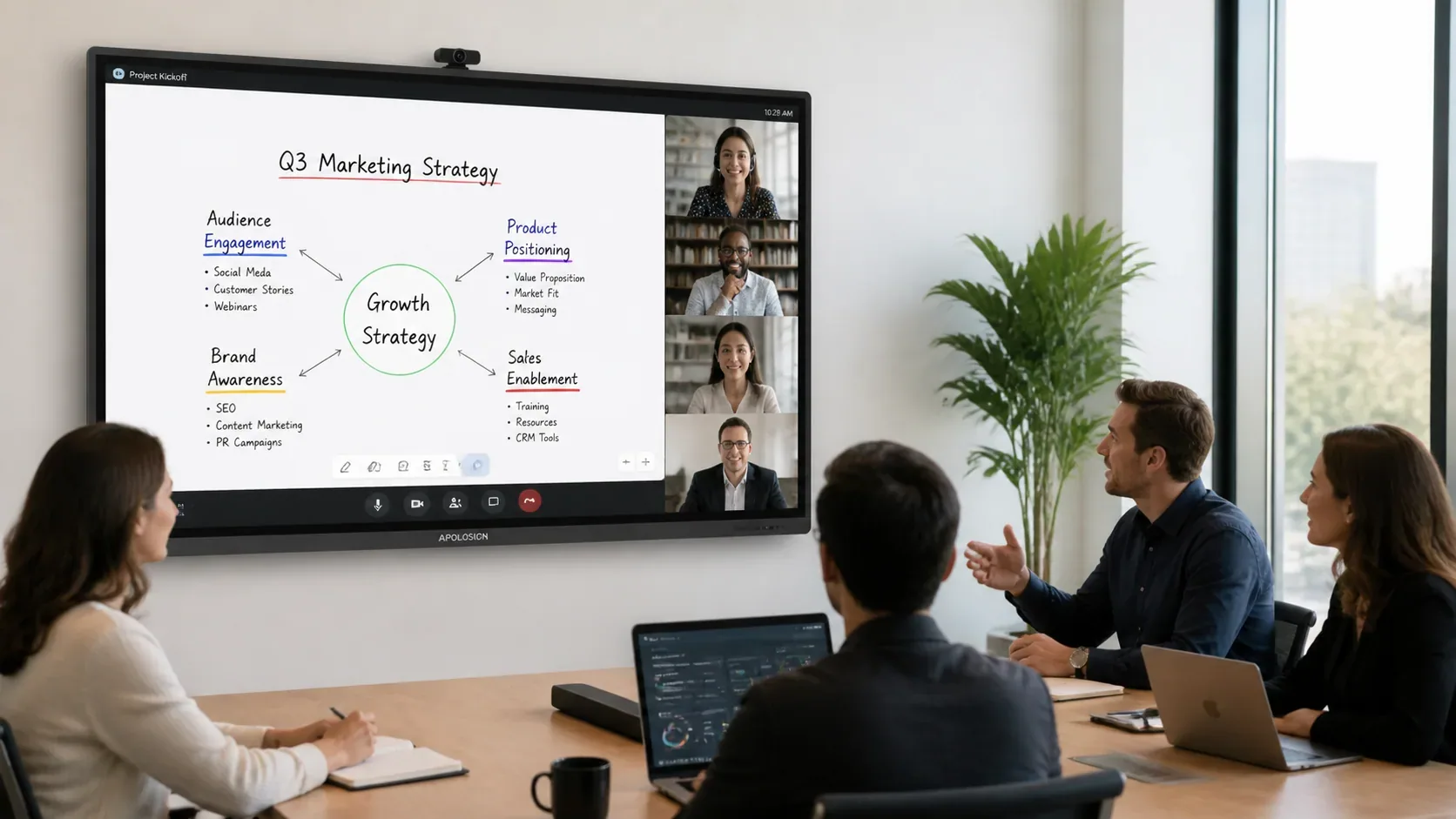
73% of hybrid teams struggle with engagement during remote presentations, and most organizations waste thousands on fragmented tech stacks that don't talk to each other. The reality is frustrating: one person connects via HDMI, another tries AirPlay, the projector acts temperamental, and meanwhile remote participants squint at pixelated content. Every meeting starts with technical friction instead of strategic focus.
The Apolosign Digital Whiteboard Display changes that equation entirely by combining 4K UHD resolution, capacitive touch technology, wireless screen mirroring, and professional-grade annotation tools into a single device. Rather than juggling multiple incompatible systems, teams get one unified platform that speaks every device's language and delivers crystal-clear visuals to everyone in the room and on the call.
Discover how Apolosign's Digital Whiteboard Display transforms hybrid collaboration
Throughout this article, you'll see how the Apolosign Digital Whiteboard Display performs in real-world hybrid meeting scenarios, understand the technical capabilities that matter most, and learn exactly why it's becoming the centerpiece of modern collaborative workspaces.
Why Hybrid Teams Are Choosing the Apolosign Digital Whiteboard Display Over Traditional Setups
Unified collaboration platform eliminates the need for separate projectors, monitors, and whiteboard systems
When your meeting room runs on three different devices, you're not just wasting money—you're wasting time. The Apolosign consolidates everything into one integrated solution, meaning no more switching between input sources or troubleshooting compatibility issues mid-presentation.
Reduced technical friction with single device means fewer connection points, fewer compatibility issues, and faster meeting starts
Every additional device in your tech stack introduces another potential failure point. A single, well-designed display reduces complexity dramatically. Teams report that meetings start on time more consistently and technical delays drop significantly.
Cost efficiency over time replaces multiple expensive tools with one integrated solution, reducing total cost of ownership
The arithmetic works out quickly. A quality projector costs $800 to $2,000. An interactive whiteboard adds another $1,500 to $3,000. A separate monitor system runs $500 to $1,500. The Apolosign replaces all three, and within the first year of avoided repairs and replacements, the cost advantage becomes obvious.
Improved participant engagement ensures remote attendees see the same high-resolution content as in-room participants in real-time
Remote participants are no longer watching a fuzzy projection on a grainy video feed. They see the same crisp 4K visuals as people sitting at the table, which fundamentally changes engagement levels and reduces the "second-class participant" feeling that plagues hybrid meetings.
Faster adoption rates with intuitive touchscreen interface requires minimal training compared to complex projection systems
The Apolosign's interface mimics smartphone and tablet interaction patterns that most professionals already know. Teams reach full proficiency within weeks rather than months, and IT support tickets for "how do I connect?" drop dramatically.
Scalability for growing teams available in 55 inch to 98 inch sizes to fit any meeting room or classroom environment
Whether you're outfitting a small huddle room or a large training facility, the Apolosign line scales with your needs. As your organization grows, you can add displays to new spaces without learning a completely different system.
Professional appearance with sleek, modern aesthetic enhances the credibility of presentations and client interactions
A dated projector setup signals that a company hasn't invested in modern infrastructure. The Apolosign's contemporary design reinforces that your organization takes collaboration seriously and invests in tools that matter.
Core Technical Features That Drive Hybrid Meeting Performance
4K UHD resolution ensures crystal-clear visuals visible to remote participants and in-room participants
4K resolution (3840 x 2160 pixels) delivers text clarity at distance, making spreadsheets, diagrams, and detailed graphics readable from anywhere in the room or on any video conference. Standard 1080p displays start looking blurry in comparison once you experience this level of clarity.
Capacitive and infrared touch support enables responsive multi-touch capability for simultaneous annotations from multiple users
Two people can annotate simultaneously, and the display responds instantly. Capacitive technology provides the responsiveness that older resistive touchscreens simply can't match, making real-time collaborative markup feel natural rather than frustrating.
Wireless screen mirroring provides seamless connection from laptops, tablets, and smartphones without HDMI cables
HDMI cables introduce cable management nightmares, adapter costs, and moments when someone brings a device without the right port. Wireless mirroring works across AirPlay, Miracast, and proprietary protocols, so practically any device connects within seconds.
Built-in Android operating system includes pre-loaded apps and instant access to collaboration software without external devices
The operating system runs pre-loaded applications, so you don't need an external computer, Chromebook, or streaming device to access cloud storage, video conferencing platforms, or collaboration tools. It's all built in and ready.
Multi-connectivity options with USB, HDMI, Wi-Fi, and Bluetooth ensure compatibility with any device or platform
Modern workplaces have Windows laptops, Macs, iPads, Android tablets, and everything in between. The Apolosign's multiple connection standards mean no device gets left behind.
Integrated whiteboard software includes annotation tools, drawing features, and real-time markup capabilities built into the system
Rather than buying a third-party whiteboard app license for each user, the built-in software gives everyone drawing, shape, and markup tools immediately available. No additional software to install or teach.
Conference room peripherals support compatible with video conferencing systems, microphone arrays, and camera setups
The Apolosign integrates cleanly with Zoom Room hardware, Cisco systems, Polycom endpoints, and professional audio setups. It works alongside your existing conference infrastructure rather than replacing or conflicting with it.
Screen sharing with multiple sources displays content from multiple devices simultaneously without switching
Imagine comparing two documents side-by-side, one from each participant's laptop. The Apolosign shows both without requiring someone to manually switch sources. This capability transforms how design teams, legal teams, and research groups collaborate.
Real-World Applications Across Different Industries and Meeting Types
Corporate hybrid meetings keep remote team members engaged with live annotations and shared workspace visibility
Sales teams use the Apolosign to walk clients through proposal decks while remote team members contribute ideas in real-time. The experience feels like everyone's in the same room, which is precisely the point.
Educational classrooms use interactive teaching tools that boost student engagement and enable distance learning participation
Instructors annotate lesson slides live, students contribute to whiteboards from their seats, and remote learners see everything with the same clarity. Learning outcomes improve when all students—regardless of location—experience the same visual quality.
Training and onboarding sessions enable collaborative demonstrations with real-time feedback and multi-user annotation
New employees see detailed product walkthroughs in 4K. Trainers mark up screens to highlight key points. Trainees from multiple locations participate fully, reducing the need for repeated training sessions.
Client presentations impress stakeholders with professional 4K visuals and interactive content manipulation
Walking a client through your proposal while responding to their questions in real-time—with crisp visuals and the ability to instantly markup their feedback—creates a dynamic, professional impression that static presentations simply can't match.
Design and creative collaboration allows architects, engineers, and designers to sketch, iterate, and refine ideas in real-time
An architect in one city, a structural engineer in another, and the client on video conference can collaborate on building designs. Each person contributes sketches and annotations to the same canvas simultaneously.
Medical and healthcare settings display diagnostic imaging, patient data, and collaborative treatment planning
Radiologists review imaging with specialists who are geographically distributed. The high resolution ensures diagnostic details remain visible, and the annotation tools allow physicians to mark up findings for discussion.
Legal and compliance meetings enable secure document sharing and annotation for case reviews and contract discussions
Legal teams need to mark up contracts, highlight discrepancies, and discuss specifics. The Apolosign's native encryption and user authentication make this work secure, while the annotation capabilities enable detailed markup and revision tracking.
Sales and pitch environments provide dynamic product demonstrations that respond to client questions and feedback
Rather than showing a pre-recorded demo, sales teams interact with the product live on the Apolosign display, responding to prospect questions and showing exactly the features that matter to that specific client.
Connectivity and Integration Capabilities for Seamless Workflow
Wireless casting from multiple platforms supports AirPlay, Miracast, and proprietary mirroring protocols
Whether your team standardized on Apple devices, Windows machines, or a mix, wireless casting works. The Apolosign communicates with all major platforms, and connection happens so quickly that users forget they're going wireless.
Native integration with major video conferencing tools works directly with Zoom, Microsoft Teams, Google Meet, and Webex
The Apolosign displays conference participants, shares the whiteboard back to remote viewers, and manages audio routing—all without requiring HDMI passthrough to an external computer. The integration is clean and direct.
USB-C and HDMI flexibility accommodates both modern and legacy devices in your existing tech ecosystem
Some team members have brand-new laptops with only USB-C ports. Others use older machines with only HDMI. The Apolosign accepts both, so nobody has to buy adapters or get frustrated.
Bluetooth peripheral support pairs wireless keyboards, mice, styluses, and presentation clickers instantly
Connect your presenter remote without thinking about it. Use a wireless stylus for annotations. Bluetooth pairing happens automatically for frequently-used devices.
Network connectivity options include Ethernet and Wi-Fi 6 support for stable, high-bandwidth connections
Wi-Fi 6 provides the speed and stability that older Wi-Fi standards can't deliver. For critical conference rooms, Ethernet provides a hardwired connection for absolute reliability.
Cloud-based content access pulls presentations directly from OneDrive, Google Drive, Dropbox, and other cloud services
Rather than email attachment hassles, users browse and open presentations directly from their cloud storage. Files update automatically, so everyone sees the latest version.
API and custom integration connects with your organization's specific software and workflows
If your company uses proprietary software, the Apolosign's API allows custom integrations so the display fits naturally into your specific workflows rather than forcing you to change how you work.
Automatic device recognition learns and remembers frequent user connections for faster access
Your laptop's connection gets saved. Next time you walk into the room and wake the display, it recognizes your device and prepares to mirror instantly.
Addressing the Investment: Pricing, ROI, and Hidden Cost Considerations
Price range overview typically ranges from $1,000 to $4,000 plus depending on screen size and feature package
Smaller 55-inch models start around $1,000 to $1,500. Mid-range 65 to 75-inch displays run $2,000 to $3,000. Large 85 to 98-inch installations command $3,500 to $4,000+. The investment reflects the size and premium feature set you're purchasing.
Size-to-price correlation shows 55 inch models start lower while 75 inch to 98 inch displays command premium pricing
A 55-inch display works perfectly for huddle rooms and smaller meeting spaces. Go to 75 inches and you're talking a larger room with more participants. 85 to 98-inch displays serve training rooms and auditorium-style setups. Size matters for room fit, and price reflects the manufacturing costs.
ROI calculation replaces separate projector, interactive whiteboard, and monitor systems with one device
Calculate your return on investment with Apolosign's all-in-one solution
When you add the cost of three separate systems plus installation, cabling, and ongoing maintenance, the Apolosign's price point often matches or beats the alternative. Year two and beyond, the arithmetic tilts decisively in favor of consolidation.
Maintenance cost reduction means fewer devices result in lower repair, replacement, and software licensing expenses
One device to maintain beats three. Support costs drop. Spare parts inventory shrinks. Software licensing becomes simpler. These savings compound year after year.
Energy efficiency gains with single device consuming less power than multiple systems running simultaneously
A projector runs hot and pulls significant power. An interactive whiteboard adds more. A separate monitor adds more still. The Apolosign consumes less total energy than the sum of its components, which reduces electricity costs and cooling load in your facility.
Warranty and support packages offer extended coverage options available to protect your investment
Apolosign provides tiered warranty and support options. Extended warranties cover accidental damage and wear. Premium support tiers include on-site service and priority response. These options spread your risk and protect your investment.
Financing and leasing options allow many organizations to spread costs through monthly payment plans
Rather than a large capital purchase, many organizations prefer monthly payments that align with their cash flow. Leasing also simplifies upgrades when newer models become available.
Hidden savings include reduced IT support time, fewer compatibility troubleshooting calls, and streamlined procurement
IT teams spend less time troubleshooting "why won't it connect?" calls. Procurement teams order one device instead of three. These hidden labor savings often equal or exceed the hardware cost savings.
Setup, Learning Curve, and Practical Implementation Challenges
Physical installation requirements include wall mounting, VESA compatibility, and proper ventilation considerations
The Apolosign mounts on standard VESA wall mounts, similar to large monitors. Installation involves finding wall studs, proper leveling, and ensuring adequate clearance for ventilation. Most facilities can handle this with standard AV installation contractors.
Space planning involves optimal viewing distance calculations and room layout adjustments for maximum visibility
A 55-inch display requires different room dimensions than a 98-inch installation. Viewing distance, seating arrangement, and ambient lighting all factor into optimal placement. Apolosign provides guidelines for each screen size.
Initial software configuration requires network setup, app installation, and user account creation
Out of the box, the Apolosign needs to connect to your network and have user accounts configured. This typically takes an IT team member an hour or two to complete properly. The process is straightforward but not instantaneous.
First-time user experience shows touchscreen interface is intuitive, but annotation tools require brief orientation
Most users intuitively understand how to tap the screen and navigate menus. Annotation tools—drawing, shapes, colors, layers—take a brief tutorial. Within a few uses, teams use these features confidently.
IT department involvement includes network security settings, device management protocols, and firmware updates
Security-conscious organizations implement device management, restrict certain apps, and enforce update protocols. This adds some complexity but ensures the device integrates properly with corporate security standards.
Training timeline shows most teams reach full proficiency within 2 to 4 weeks of regular use
Day one, people can make basic connections and navigate the interface. By week two, they're comfortable with annotation and multi-source sharing. By week four, advanced features like custom templates and integrated recording feel natural.
Common setup mistakes include inadequate wall space, poor ambient lighting, and insufficient network bandwidth
The most frequent problems involve mounting locations with insufficient wall space, bright windows creating screen glare, or Wi-Fi networks too congested to handle video streaming. These are avoidable with proper planning.
Ongoing support resources include video tutorials, documentation, and customer support channels from Apolosign
Rather than leaving customers to figure things out alone, Apolosign provides comprehensive documentation, video walkthroughs, and support teams ready to help. Response times for support queries are typically within hours, not days.
Performance Comparison: How Apolosign Stacks Against Competitor Solutions
Visual clarity advantage with 4K resolution surpasses standard 1080p competitor offerings
Many competitors still offer 1080p as their base model. For professional settings, the difference in text readability and visual clarity is immediately noticeable. 4K isn't luxury; it's the standard Apolosign meets across its line.
Touch responsiveness with capacitive technology delivers faster, more precise interaction than resistive alternatives
Older resistive touchscreen technology feels sluggish compared to capacitive. Apolosign's capacitive implementation responds instantly and supports smooth multi-touch gestures like pinch-to-zoom and two-finger rotation.
Annotation capabilities include more advanced markup tools than many competitors offer
While some competitors include basic drawing tools, Apolosign's annotation suite rivals dedicated software. Shapes, text, layers, colors, transparency—the toolkit is comprehensive.
Wireless connectivity range provides superior Wi-Fi and Bluetooth performance compared to lower-tier brands
Some displays struggle with wireless connections beyond 20 feet or through walls. Apolosign's connectivity handles typical office and classroom distances reliably, even through building materials.
Software ecosystem with pre-loaded apps and integration options exceeds what most competitors bundle
Rather than a bare Android installation, Apolosign pre-loads collaboration apps and provides direct integration with major platforms. This means you get productivity value immediately, not after spending weeks on configuration.
Durability and build quality feature industrial-grade components designed for heavy daily use
Apolosign displays use premium panels and durable touchscreen glass designed to withstand daily use in busy environments. This translates to longer device lifespan and fewer repair incidents.
Customer support reputation shows Apolosign's service team consistently outperforms industry averages in response time
Industry data shows Apolosign support responds faster than most competitors and resolves issues more completely. Customer satisfaction scores reflect this commitment to service.
Long-term value with regular software updates and feature additions extend device lifespan
Rather than abandoning older devices, Apolosign releases regular firmware updates adding features and improving performance. A 2021 Apolosign display gets meaningful software improvements in 2023 and beyond.
Maximizing Your Hybrid Meeting Experience with Pro Tips and Best Practices
Optimize lighting conditions to reduce glare and reflections for better screen visibility for all participants
Position the display perpendicular to windows if possible, or install window coverings to prevent glare. Overhead lighting should illuminate the room without creating reflections on the screen. These simple adjustments dramatically improve visibility.
Position cameras strategically to ensure remote participants see both the display and in-room participants
Mount the camera at eye level with the display in frame, so remote attendees see the in-room participants and the shared content together. This positioning helps remote participants feel included in the meeting rather than watching a broadcast.
Test connectivity before meetings to verify wireless connections and backup HDMI options are ready
Five minutes before an important presentation, verify that wireless casting works and that HDMI adapters are available if needed. This simple test prevents the "I can't connect" crisis that undermines confidence.
Use annotation features actively to encourage participants to mark up content in real-time for engagement
Don't just display content passively. Invite participants to come up and annotate, circle important points, or draw their ideas. Active annotation boosts engagement and creates a record of collaborative thinking.
Establish screen-sharing protocols to designate who controls the display and prevent chaos and maintain focus
When multiple people try to share simultaneously, chaos ensues. Before meetings, agree on who will control the display and when. This prevents conflicting inputs and keeps meetings focused.
Leverage recording capabilities to capture sessions with annotations for asynchronous review and documentation
Record important meetings with annotations intact. Share the recording with participants who couldn't attend and with team members who want to review detailed discussions. Annotations become part of the permanent record.
Customize whiteboard templates to create branded templates for different meeting types and agendas
Build templates for your standup meetings, brainstorming sessions, client reviews, and training classes. Branded templates with your company colors and pre-drawn structures accelerate meeting starts and maintain consistency.
Schedule regular firmware updates to keep the device current with security patches and performance improvements
Set a quarterly update schedule to ensure the display runs the latest firmware. Updates deliver performance improvements and security patches that keep your investment protected.
Security, Data Privacy, and Compliance Considerations for Organizations
Network security features include built-in firewalls and encryption that protect sensitive meeting content
The Apolosign includes firewall protection and encrypts data transmitted over Wi-Fi. Wireless connections encrypt end-to-end, preventing eavesdropping on meeting content shared wirelessly.
User authentication options include password protection, PIN codes, and single sign-on integration available
Organizations requiring authentication can enable login requirements, PIN codes for guest access, or integrate single sign-on systems that sync with corporate directories. Access control becomes granular and auditable.
Data privacy standards ensure compliance with GDPR, HIPAA, and other regulatory frameworks
The Apolosign architecture supports GDPR compliance for EU organizations, HIPAA requirements for healthcare settings, and other regulatory needs. Legal and compliance teams can audit the system confidently.
Content encryption protects wireless transmission and stored data with industry-standard protocols
Content transmitted wirelessly uses encryption standards identical to banking and military applications. Storage of files accessed through the device follows encryption protocols that satisfy compliance requirements.
Admin controls and permissions allow IT teams to restrict features, manage user access, and monitor usage
IT administrators can disable certain features, restrict external connections, or require approval for specific capabilities. Device management tools provide centralized control across multiple displays.
Audit trails and logging track who accessed the device and when for compliance documentation
Organizations requiring audit trails can enable comprehensive logging showing every user action, connection, and content access. These logs support compliance audits and security investigations.
Guest access limitations provide secure options for allowing external participants without compromising data
Rather than giving external participants full device access, organizations can enable guest mode that restricts capabilities while still allowing collaboration. This balances openness with security.
Regular security updates from Apolosign release patches proactively to address emerging threats
When security vulnerabilities emerge, Apolosign releases patches quickly rather than waiting for a quarterly update cycle. Proactive security management keeps devices protected against evolving threats.
Future-Proofing Your Collaboration Infrastructure with Scalable Technology
Modular software architecture allows new features and apps to be added without replacing hardware
The operating system supports app installations and feature additions. Tomorrow's collaboration tools can deploy to today's hardware without requiring device replacement. This extends the useful lifespan significantly.
Extended device lifespan with regular updates ensures the display remains relevant for 5 to 7 plus years
With continuous software improvements and feature additions, Apolosign displays remain capable and relevant far longer than typical display lifespan. A 2021 model running 2024 software remains current.
Expandable ecosystem integrates additional Apolosign displays for larger spaces or multi-room setups
Organizations can network multiple Apolosign displays together, creating synchronized displays in adjacent rooms or multi-display control centers. Growth happens through addition, not replacement.
AI-powered features include emerging capabilities like automatic transcription and intelligent meeting summaries
Apolosign is developing AI features that transcribe meetings, extract action items, and create intelligent summaries. These capabilities will roll out to existing hardware through software updates.
5G and advanced connectivity prepare the device for next-generation network speeds and reliability
As 5G networks expand, Apolosign's Wi-Fi 6 and network architecture are positioned to leverage faster speeds. The hardware won't become obsolete as connectivity improves.
Accessibility improvements provide ongoing enhancements for users with different abilities and needs
Apolosign is committed to accessibility, releasing updates that improve support for screen readers, voice control, and other accessibility features. Inclusivity improves continuously.
Integration roadmap shows planned compatibility with emerging collaboration platforms and tools
Apolosign's development team watches emerging platforms and builds integration support. When new tools appear, existing Apolosign displays gain compatibility through updates rather than needing replacement.
Resale value means well-maintained Apolosign displays retain value in the secondary market
When your organization eventually upgrades, used Apolosign displays sell readily on the secondary market. Resale value offsets some of the original investment and supports a circular economy.
Making the Shift: Why Now Is the Right Time to Invest in Apolosign's Digital Whiteboard Display
The hybrid work landscape has fundamentally changed how teams collaborate, and the tools you choose either accelerate that transformation or hold you back. The Apolosign Digital Whiteboard Display has become the centerpiece of effective hybrid meeting rooms—from its stunning 4K visuals and responsive touch technology to its seamless wireless connectivity and robust security features. The investment ranges from $1,000 to $4,000+, which becomes obvious quickly when you calculate the cost of maintaining separate projectors, interactive whiteboards, and display monitors.
Remote and hybrid work isn't a temporary experiment anymore; it's the permanent operating model for most teams. Meeting rooms without professional collaboration technology cost organizations far more in lost productivity, duplicated efforts, and reduced engagement than they save by cutting corners on display quality. The Apolosign transforms meeting spaces into productive collaboration zones where remote and in-room participants experience equal clarity and engagement.
The competitive advantage belongs to organizations making collaboration infrastructure investments now, when hybrid work is normalizing and becoming embedded in how teams operate. Your competitors are already upgrading their meeting spaces. Your team's ability to collaborate seamlessly across locations directly influences whether your organization leads or lags in the hybrid economy.
By choosing the Apolosign Digital Whiteboard Display now, you're not just solving today's collaboration challenges—you're building infrastructure that scales with your organization's future. The device improves continuously through software updates, integrates with emerging tools, and maintains relevance for years. That combination of present-day capability and future-proof architecture makes the investment one of the clearest returns available to organizations serious about hybrid collaboration.
Start transforming your meeting rooms with Apolosign's Digital Whiteboard Display today